

Requesting leave
You request leave directly from the calendar, in a few clicks.
- In the calendar, click a day, or click and drag across several days. The selected days are highlighted, and New request on the right shows how many there are.
- Click Request.
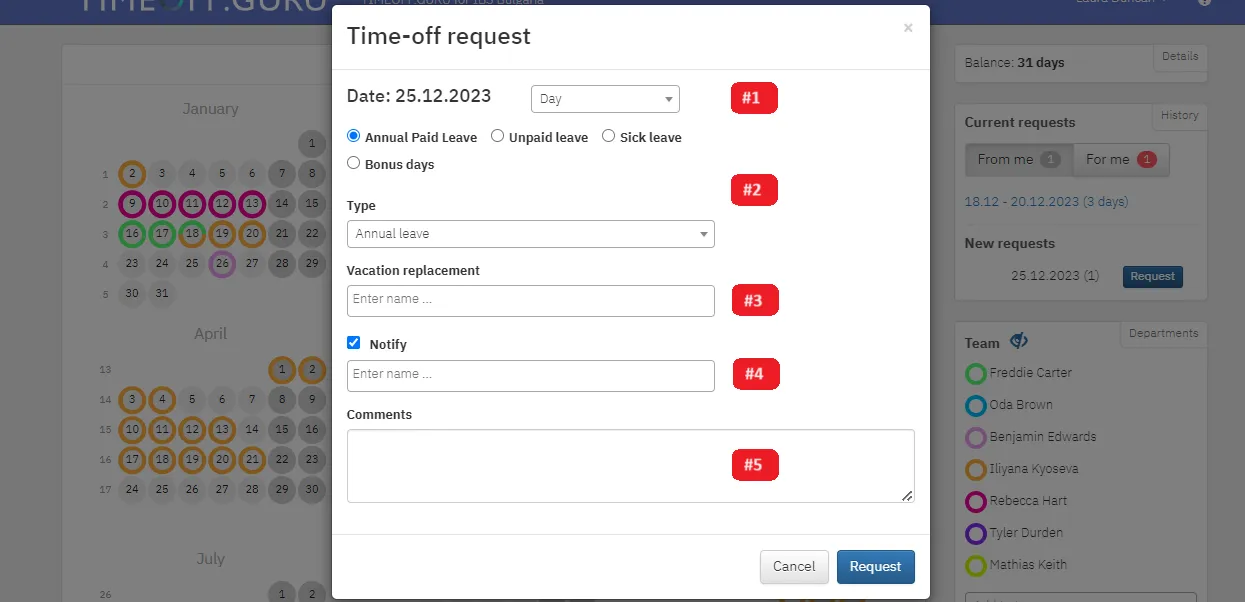
- Fill in the request:
- Period: for a single day you can choose half a day (before or after noon) or specific hours;
- Leave category and type: paid, unpaid, sick leave, compensation and so on. The types depend on your organization’s settings;
- Vacation replacement: the colleague who substitutes for you;
- Notify: up to 5 colleagues who should know you are away;
- Comments: optional.
- Click Request again. You will see a confirmation.
Once you submit the request, the days are deducted from your balance. Details next to your balance shows how many days you have and how many you have used.