Settings → Settings, the Settings tab.
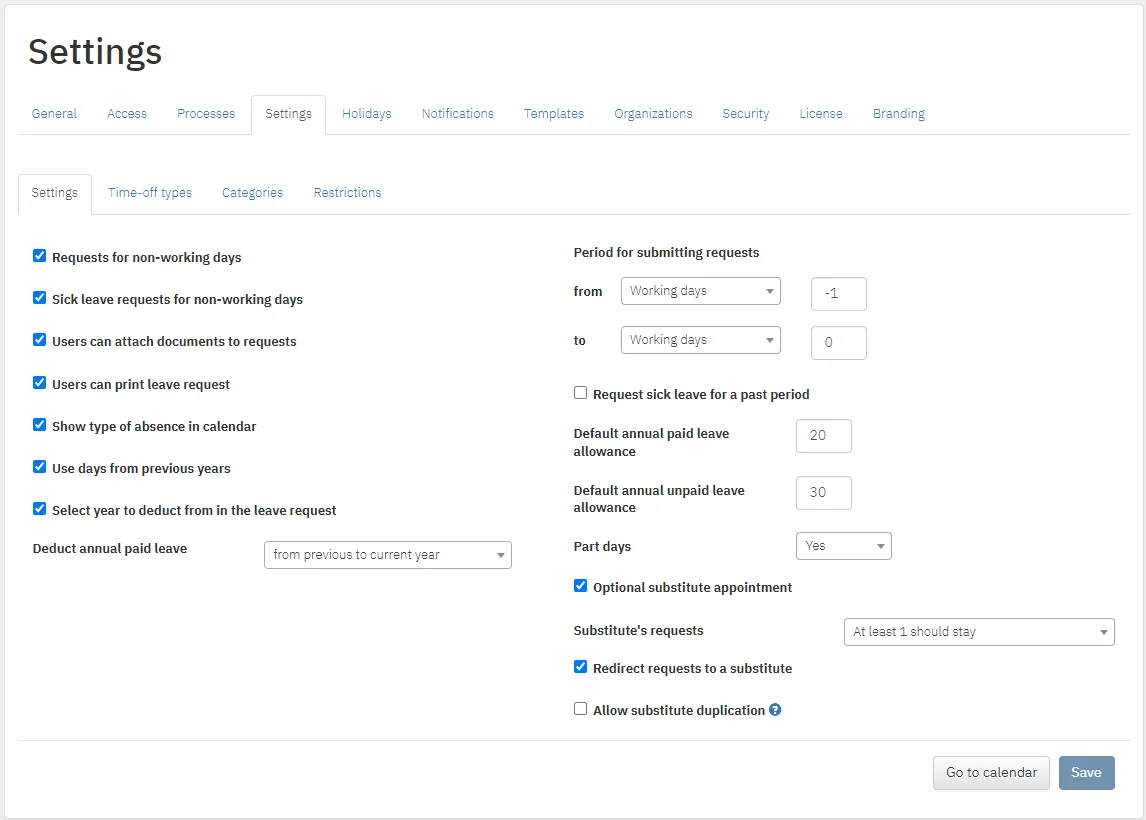
| Setting |
What it does |
| Requests for non-working days |
Allows leave on weekends and holidays |
| Sick leave requests for non-working days |
Allows sick leave on weekends and holidays |
| Users can attach documents to requests |
Employees attach files to requests. It also has to be allowed for the leave type |
| Users can print leave request |
Employees print the request form from Current requests and the leave order from History |
| Show type of absence in calendar |
Hovering over a day shows a colleague’s leave type |
| Part days |
Which leave types can be requested for part of a day |
| Setting |
What it does |
| Use days from previous years |
Employees can use unused days from earlier years |
| Select year to deduct from in the leave request |
The employee picks which year the days come from. Switched on automatically with the previous option |
| Deduct annual paid leave |
Deduction order: from the oldest year to the current one, or from the current year back |
| Setting |
What it does |
| Period for submitting requests |
How far back or ahead requests can be made, in calendar or working days. 0 means no limit |
| Request sick leave for a past period |
Sick leave for a past period, regardless of the limit above |
| Default annual paid leave allowance and Default annual unpaid leave allowance |
The days loaded for every employee each year |
| Setting |
What it does |
| Optional substitute appointment |
A request can be submitted without a substitute. Without this option, each user’s profile is set to: mandatory (predefined people only), allow other (required, any colleague) or no replacement |
| Substitute’s requests |
Whether someone named as a substitute can request leave for the same period: allow for all, at least 1 should stay, or prohibited |
| Redirect requests to a substitute |
If an approver is on leave, requests go to their substitute instead of waiting for their return |
| Allow substitute duplication |
One person can substitute for several colleagues at once |

