

Roles and access
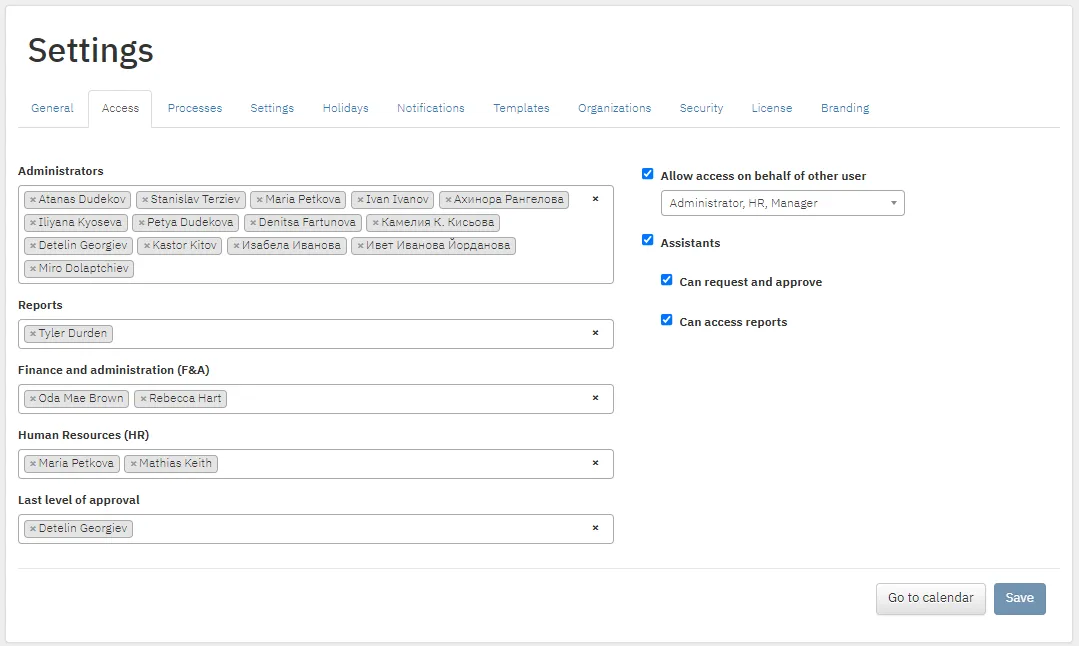
Settings → Access. Add a user to a role by typing their name in the field. Remove them with the X in front of the name.
| Role | What it can do |
|---|---|
| Administrators | Everything: reports, settings, users, working on behalf of others, managing roles |
| Reports and Finance and Administration | Reports and editing requests |
| Human Resources | Reports, editing requests, managing users and working on behalf of everyone. The only role that can see attachments |
| Last level of approval | Reports and editing requests. Usually the head of the organization |
Finance and Administration, Human Resources and Last level of approval can also take part in the approval process.
Working on behalf of others
Section titled “Working on behalf of others”Allow access on behalf of other user sets who can use Switch user:
- administrators only;
- administrators and HR;
- administrators, HR and managers: direct managers can work on behalf of their team.
Assistants
Section titled “Assistants”With Assistants you add assistants to a user’s profile. An assistant sees the same information as the user. You also choose whether assistants can request and approve on the user’s behalf and whether they can access reports.