

Approval process
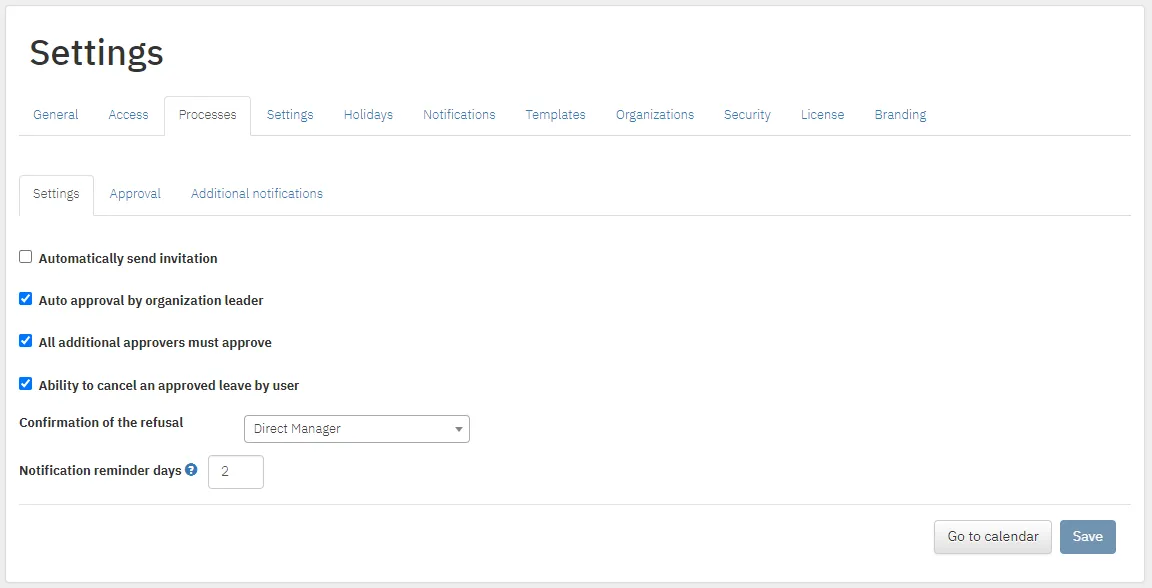
Settings → Processes.
Approval steps
Section titled “Approval steps”In Approval you define who each request goes through. Add a step with Add step. For each step, tick which roles are notified and when.
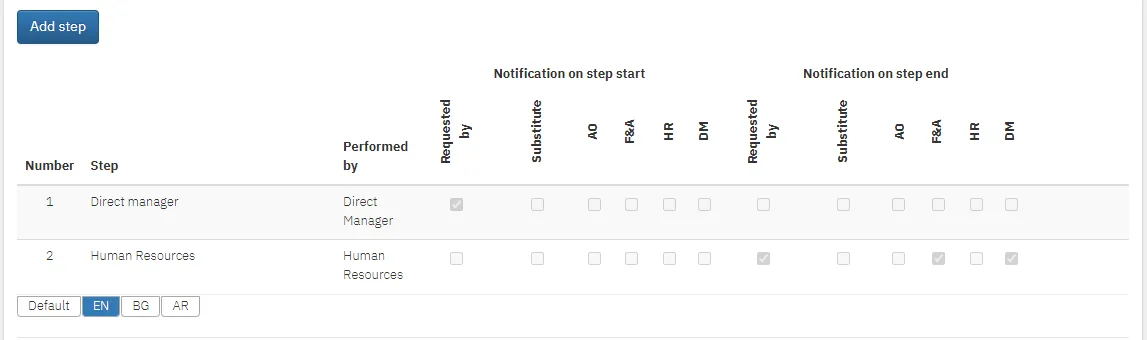
Example: the employee requests leave and is notified that the request is registered. The direct manager approves, then HR. When HR approves, the requester, the direct manager and finance are notified.
| Abbreviation | Role |
|---|---|
| Requested by | The requester |
| Substitute | The vacation replacement |
| DM | Direct manager |
| AO | Additional approver |
| HR | Human Resources |
| F&A | Finance and Administration |
Process settings
Section titled “Process settings”| Setting | What it does |
|---|---|
| Automatically send invitation | When creating a user, you pick a date on which the system sends the invitation |
| Auto approval by organization leader | The “organization leader” step is approved automatically |
| All additional approvers must approve | Every additional approver has to approve. Without it, one is enough |
| Ability to cancel an approved leave by user | Employees can cancel approved leave, with a reason. In Confirmation of the refusal you choose who confirms: HR, direct manager, organization leader, finance, additional approver or no one. If leave is cancelled mid-way, only the days taken remain |
| Notification reminder days | How many days before an absence approvers are reminded of pending requests |
Additional notifications
Section titled “Additional notifications”In Additional notifications you set who is notified, and when, about: a sick leave request, sick leave cancelled by the employee, a request cancelled by the employee, a request with no approval process, and a file attached to a request.