
Staff leave planner
Staff leave planner: who is away and when, in one calendar
A yearly calendar where everyone sees their team's absences, and managers plan busy periods before any request is submitted.
What is a staff leave planner?
A staff leave planner is a shared view of who in the team is away and when. On paper or in a spreadsheet, one person sees it and it is out of date after the first change. In a shared calendar, everyone sees the current picture before choosing their days.
- 1
A yearly calendar for the whole team
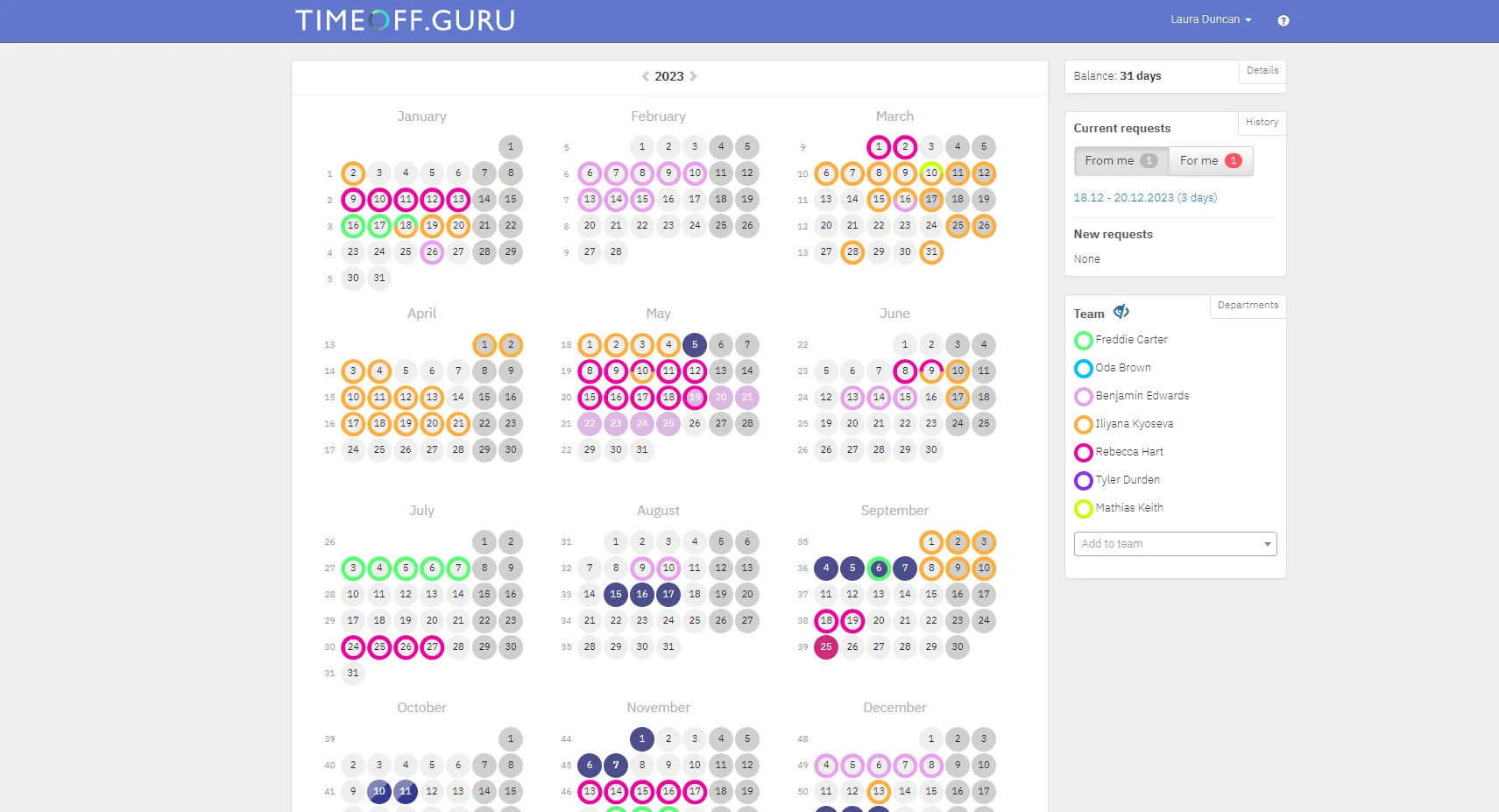
After signing in, everyone sees their own absences and their colleagues' for the whole year.
- Your days are filled in; colleagues' days have a coloured ring around the date.
- Hover over a day to see who is away, the leave type and who covers for them.
- Add individual colleagues or whole departments to your calendar, each in their own colour.
- The administrator decides who you can see and whether the absence type is shown.
- 2
Planning before the requests
In Planning mode the team marks when they intend to be away, without submitting a request yet.
- You see the planned absences of the whole team in the same calendar.
- Useful in busy periods and in large teams.
- Turned on by the administrator in the general settings.
- 3
No overlap between key people
Substitute rules keep the work going.
- A colleague who has already requested leave for the same period is not offered as a substitute.
- The approver gets a warning if the substitute is already covering for someone else.
- Block days when nobody can take leave, for example around a major delivery.
- If the approver is on leave, requests go to their substitute.
- 4
Holidays and work locations in the same calendar
The planner covers more than leave.
- Public holidays by country, with a separate set for each country.
- Who is in the office, at home or at a client.
- The calendar is also in the mobile app for iOS and Android.
Frequently asked questions
All questions →What is a staff planner?
A staff planner is a shared calendar showing who in the team is at work and who is away. In TIMEOFF.GURU it is the yearly team calendar together with the Planning mode.
Can employees see their colleagues' absences?
Yes, for the colleagues they have added to their team. The administrator decides who they can add and whether hovering over a day shows the absence type.
Can leave be planned ahead without submitting a request?
Yes. When planning is turned on, employees mark when they intend to be away, and managers see the picture for the whole team before there are requests to approve.
Does the planner work on a phone?
Yes. The mobile app shows the current month with your absences and your team's, and leave is requested and approved straight from the phone.
Retire the leave spreadsheet this week.
14 days free, full access, no credit card. Or let us show you around in 20 minutes.
or book a demo →